Pfam Domain Query Tutorial: How to Map Protein Function From a Sequence?
Published on November 9, 2026
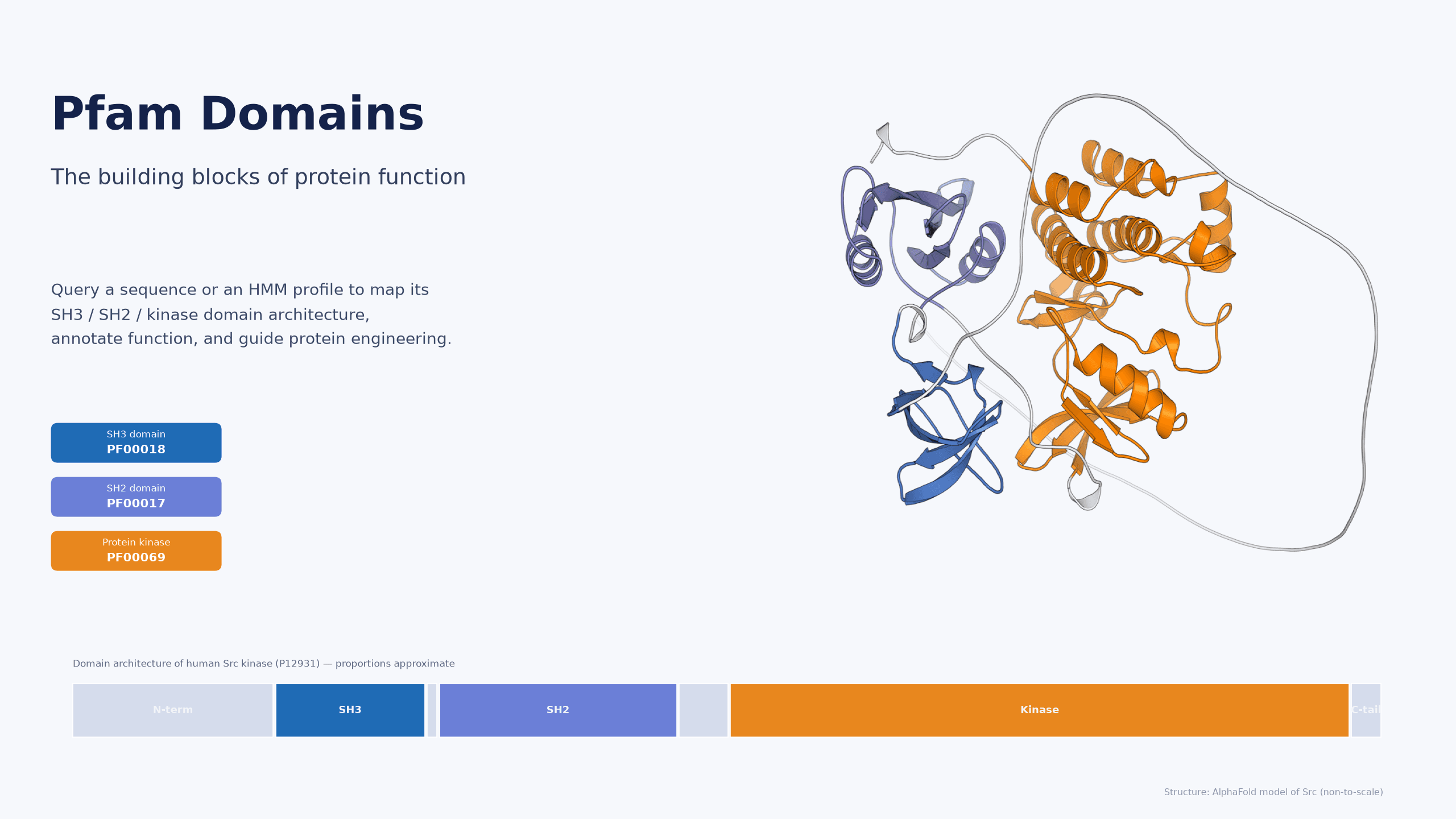
Figure 1. Proteins are assembled from recognizable domain modules
A protein is not a shapeless polypeptide; it is assembled from discrete, reusable modules called domains. Each domain typically performs a recognizable job — the SH2 domain recognizes phosphotyrosine, the SH3 domain binds proline-rich motifs, and the Kinase domain transfers a phosphate group. Once you know which domains a protein sequence is built from (its domain architecture), you can often infer what it binds, how it signals, and what it does.
Pfam is the most widely used “dictionary of protein domains”: it distils thousands of multiple sequence alignments into hidden Markov models (HMMs), then uses those models to “scan” any new sequence and tell you which family each region belongs to. This tutorial walks you through the full Pfam domain query workflow.
Background: Why “protein = a combination of domains”?
A mature protein sequence can usually be sliced along its backbone into autonomously folding, independently evolving modules. Evolution reuses these modules: the same SH3 or SH2 domain appears in entirely different proteins. As a result, a domain is the smallest interpretable unit of function.
· Domains have a stable fold and recognition surface that engage specific ligands or substrates;
· The way domains are arranged (domain architecture) defines a protein’s “logic” — what it binds first, then what it catalyzes;
· A point mutation in a key domain (catalytic core, binding interface) often directly alters activity or specificity.
This is why “domain querying” matters: it translates an unfamiliar sequence into a functional description that humans can read — and engineer.
Principle: Pfam families, HMM models and the Clan system
Pfam’s core asset is a curated set of family models. Each family starts from a seed alignment and is trained into a profile HMM that records, for every position, the preference for each of the 20 amino acids plus insertion/deletion probabilities. Running HMMER’s hmmscan against the whole Pfam library tells you “which region, matches which family, and how confidently.”
A few concepts to keep straight:
· Pfam-A (curated) — manually reviewed, with stable accessions such as PF00017 (SH2), PF00018 (SH3) and PF00069 (Pkinase); the primary annotation source;
· Pfam-B — automatically generated, unannotated clusters, used as a supplement (not for formal functional annotation);
· Entry types — Family, Domain, Repeat, Motif, Disordered, and so on;
· Clan — groups evolutionarily related, structurally similar Pfam entries for broader interpretation;
· Not standalone — since 2022, Pfam annotations are hosted by InterPro, which also integrates SMART, PROSITE, CATH-Gene3D and other member databases, so results from one place are often more comprehensive than Pfam alone.

Figure 2. Aligning a query sequence to a Pfam profile HMM
Query: from a single sequence to full domain architecture
Using human Src kinase (UniProt: P12931) as an example, run a complete query:
1. Get the sequence. Copy the amino-acid sequence (FASTA) or simply use the UniProt accession.
2. Choose an entry point. Open the InterPro homepage and use “Search by sequence”; you can also use “Search by text” or “Search by Domain Architecture”.
3. Select member databases. In the job configuration, tick only Pfam (or keep all InterPro member databases for broader coverage) and submit InterProScan.
4. Read the hits. Each hit reports a family accession (PF00017), name (SH2 domain), matched region (151–248), E-value, coverage, and the family’s Clan.
5. Assemble the architecture. Order the hits from N to C to obtain the protein’s domain architecture — for Src, SH3 | SH2 | Kinase.
6. Cross-check. Compare with the “Family & domains” view on UniProt to reconcile annotations.
Advanced query: if you care about “which proteins contain a given set of domains”, use Search by Domain Architecture and specify the Pfam entries to include (or exclude). This quickly surfaces proteins sharing a specific domain combination — very useful for isozyme mining or parent selection in protein engineering.
Parameters and interpretation: E-value, coverage and entry type
Once you have results, how do you decide whether a hit is solid or a weak match? Look at three quantities:
· E-value (expectation value) — the expected number of equally good matches by chance; the lower, the more significant. Conventionally E-value < 0.01 is regarded as reliable; strong structural/functional hits often reach 1e-5 or lower.
· Coverage — the fraction of the query covered by the domain model. Very low coverage may indicate a fragment or a partial match and should be treated cautiously.
· Entry type — Family/Domain hits are usually more robust; Motif/Repeat entries are more sensitive but more prone to false positives. Prefer Family/Domain-level hits when annotating a protein.
Pfam also provides a per-family gathering threshold (GA) — a curated cutoff that is more precise than a single global E-value. If you want strictly full-length, low-false-positive results, tighten the threshold and check that you are not hitting only part of a domain.
Interpretation note: E-value and coverage are model-computed results used to judge “does it match”, not proof that “this domain has a given biological function”. Functional assignment still needs structural and experimental evidence; the structure figures in this tutorial are AlphaFold computational models, not experimentally determined.
MatwingsVenus® in action: from domain annotation to an engineering loop
Domain annotation is not just about “reading” — it is a starting point for engineering. MatwingsVenus® closes the loop between domain annotation → AI design → wet-lab validation:
· Domain-driven functional reading: locate catalytic cores, binding interfaces and key residues at the InterPro/Pfam level (e.g. the kinase active site) to give design a “legible” anchor point;
· AI-directed evolution and sequence design: use domain boundaries and conserved positions to generate/optimize candidate sequences and cut down blind screening;
· Dry–wet closed loop: iterate between sequence design and expression/activity/affinity assays, feeding annotations and measured data back to continuously calibrate the models;
With this loop, “domain query” becomes more than a one-off literature look-up — it turns into an engineering pipeline that keeps producing high-activity, high-stability candidates.

Figure 3. The full workflow from “input sequence → Pfam search → domain architecture annotation → engineering application” to the dry–wet closed loop
Related products / services
· Wet-lab validation & expression: Wet-Lab Center — expression, purification and activity assays after annotation.
· Expert consultation & co-design: Expert Center — protein-engineering solutions and domain interpretation.
· AI + experimental closed loop: Dry–Wet Closed-Loop Platform — an end-to-end pipeline from sequence to candidate molecules.
FAQ
Q1: What is the relationship between Pfam and InterPro?
Pfam is a domain/family database whose annotations have been hosted by InterPro since 2022; InterPro is a protein classification resource that integrates Pfam, SMART, PROSITE, CATH-Gene3D and other member databases. Using InterPro’s “Search by sequence” calls Pfam under the hood.
Q2: I only want to know which family a sequence belongs to — what is the fastest way?
Paste the FASTA sequence into InterPro’s “Search by sequence” and submit (you can tick only Pfam). The hit with the lowest E-value is the most likely family.
Q3: How small must an E-value be to count as a “hit”?
There is no universal rule. Conventionally E-values below 0.01 are treated as reliable; strong functional hits often fall below 1e-5. Combine with the family’s gathering threshold (GA) and coverage.
Q4: Why does one protein hit many Pfam entries?
Because a protein often contains multiple domains (multi-domain proteins), each matching its own family; there may also be sensitive Motif/Repeat hits. Read the “domain architecture” rather than any single entry to approach the real function.
Q5: How do I find proteins containing several specific domains?
Use InterPro’s “Search by Domain Architecture”: specify the Pfam entries to include (or exclude) to retrieve the set of proteins sharing that domain combination.
Q6: Can a Pfam hit be used directly as functional evidence?
No. A Pfam hit is a sequence-similarity-model result used to infer domain membership; whether the domain actually carries a given biological function still requires structure, expression and experimental evidence.
Q7: What if my sequence hits no Pfam family?
It may be a novel family, a low-homology fragment, or the search was too stringent. Try relaxing the E-value, check for truncation/fragmentation, or use structural search (Foldseek/structure alignment) to find distant homologs.
Summary
A Pfam domain query is essentially translating an unfamiliar sequence into a functional description that is readable, predictable and engineerable. Master the InterPro/HMMER entry points, read E-values and coverage correctly, and organize the results into a domain architecture — and you have a common starting point for protein function annotation and engineering. If you then feed that annotation into AI design and a wet-lab loop, you move from “understanding a protein” to “engineering it.” The MatwingsVenus® dry–wet closed-loop platform provides a one-stop route for exactly this path.
【One-line takeaway】 Protein function is domain function — first resolve a sequence into interpretable domains with Pfam/InterPro, then use them to guide functional annotation and engineering design.
Note: structure figures in this article are AlphaFold computational models (non-to-scale, not experimentally determined); E-value/coverage values are model-computed judgments rather than functional experimental evidence; exact numbers depend on the Pfam/InterPro release you query.